
INSTALL ASKERP
Put ASKERP on your home screen.
On iPhone, ASKERP installs from the browser in four taps and opens like an app. On Android, use the app or install it from Chrome.
IPHONE AND IPAD
Add to Home Screen
 STEP 1
Open ASKERP in Safari or Chrome
Go to askerp.asksol.pk and tap Open web app. Signing in first is fine, but you will sign in once more inside the installed app.
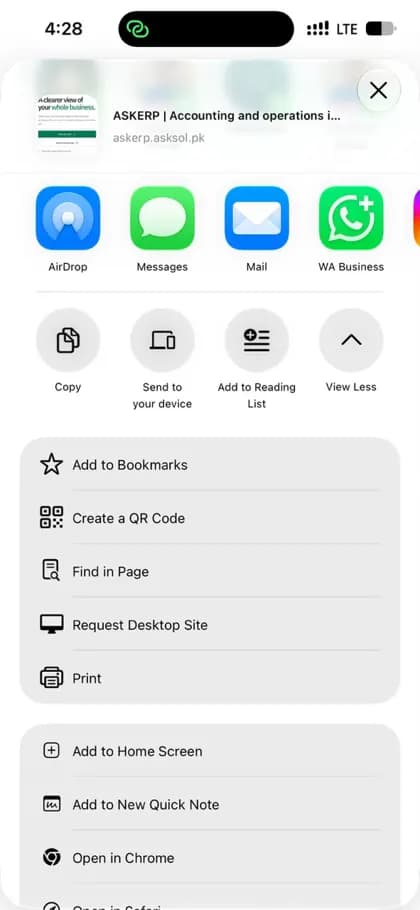 STEP 2
Tap Share, then Add to Home Screen
In Safari the Share button is at the bottom; in Chrome it is beside the address bar. Scroll the list and choose Add to Home Screen.
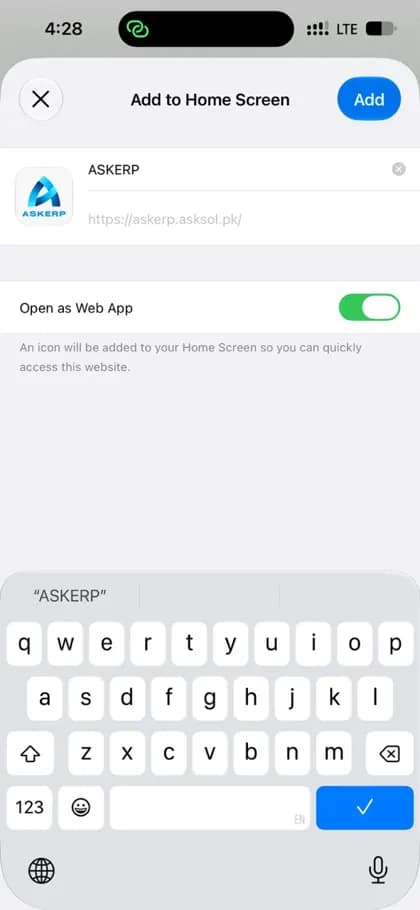 STEP 3
Keep “Open as Web App” on and name it ASKERP
Leave Open as Web App switched on so ASKERP opens full screen without the browser bar. Keep the name short — ASKERP — then tap Add.
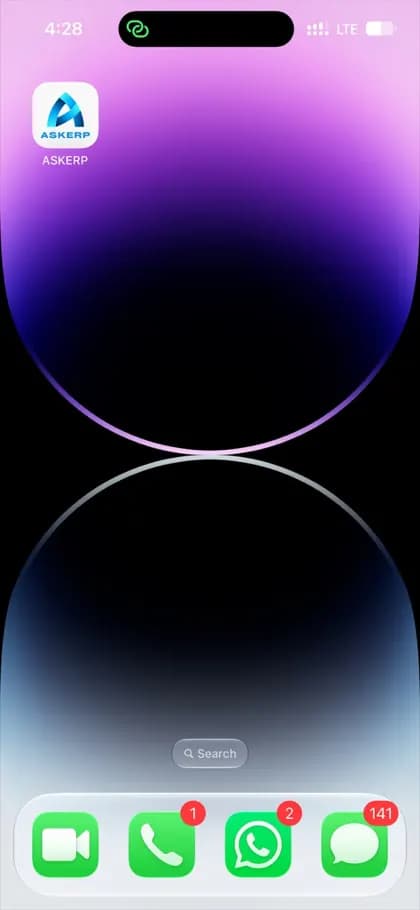 STEP 4
Open ASKERP from your home screen
The ASKERP icon now sits with your other apps. Tap it, sign in, and it opens straight to your dashboard.
- The installed app keeps its own sign-in, separate from the browser, so you sign in once inside it.
- PDFs and exports open in a viewer with the Share button, so you can save or send them.
- To remove it, press and hold the icon and choose Remove App. Your data stays in your ASKERP account.
ANDROID
Use the app, or install from Chrome
Install the ASKERP Android app, or open askerp.asksol.pk in Chrome, tap the ⋮ menu and choose Install app (or Add to Home screen). Both open the same live workspace.